Snake Bite Arena
Guide your snake around an arena, collect food and grow. Snake Bite Arena is a separate game from Snake & Bite, so you can choose an arena challenge when you want a change from the classic snake game.
How to start
- Open Khel Party on Android and choose Snake Bite Arena from the game hub.
- Pick a mode and a difficulty on the Ready to bite screen, then start the run.
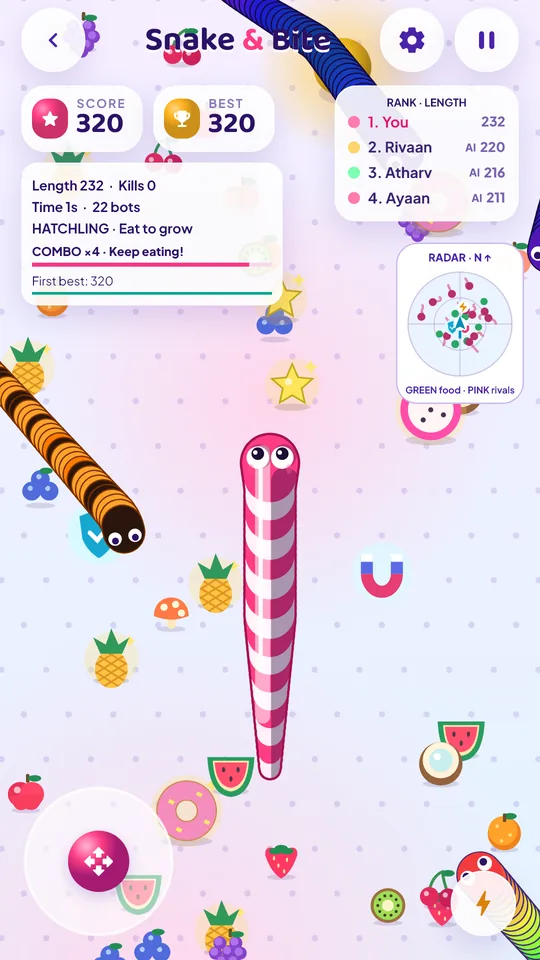
- Drag the joystick to steer, and eat food to grow longer.
- Watch the rank list to see where your length puts you against the bots.
Three modes, three kinds of pressure
Snake Bite Arena is not one endless mode with a score attached. Each of its three modes asks for something different, and the one you pick changes how you should play.
- Classic Arena — an endless world with no walls. Nothing is chasing a clock, so the only thing that ends a run is a crash. This is the mode to learn in, and the one where personal bests are set.
- Survival Challenge — last three minutes while bot pressure rises step by step. Early caution is worth more here than an early lead.
- Time Attack — score as much as you can in two minutes, and a crash ends the run there and then. Greed pays, right up until it does not.
Steering, boost and the shield
You steer by dragging the joystick with one thumb. Press a second thumb anywhere on the screen for a five-second boost, which is how you close a gap on food or pull away from a bot that is cutting you off. Arrow keys and WASD work too, which helps when you play in a browser.
A head-on crash eliminates both snakes. A shield changes that: while it is up, contact is safe for both of you, so it is worth holding one back for a crowded part of the map rather than spending it the moment you pick it up.
Bots and difficulty
The bots are not scenery. They chase the same food, they cut corners, and on the harder settings they will trap a longer snake against its own tail. Easy, Medium and Hard change both how many join and how sharply they play — Medium fills the arena with up to 22 of them. The rank list updates live by length, so you can always see whether growing is actually moving you up.
Skins, missions and power-ups
There are 30 snake skins, unlocked with coins you earn by playing or by watching an ad if you would rather not wait. They change the look and nothing else. Alongside them sit missions and achievements to work through, and food and power-ups scattered across the map that are worth learning by sight before you chase one into a bad position.
Arena or classic snake?
Choose Snake Bite Arena when you want bots, modes and a rank to climb. Choose Snake & Bite for the classic snake game, which has its own Classic, Challenge and Time Attack modes and no opponents. Both are solo, both are in the same app, and neither needs another player or a connection.
Playing tips
- Leave yourself room to turn. Steering into food with no exit is what ends most early runs.
- Look along your whole route, not just at the next piece of food.
- Save the boost for escaping, not for collecting.
- A long snake is a bigger target for its own tail. Growth is only worth it if you can still turn.
- Learn the map in Classic Arena before you take the timed modes seriously.
Frequently asked questions
Is Snake Bite Arena free?
Yes. It is part of the free Khel Party Android app. There is no separate purchase, no login and no account.
How many modes does it have?
Three. Classic Arena is an endless world with no walls, where you grow and beat your own best. Survival Challenge asks you to last three minutes while bot pressure rises. Time Attack gives you two minutes to score as much as you can, and a crash ends the run.
How do I steer, and is there a boost?
Drag the joystick with one thumb. Hold a second thumb anywhere for a five-second boost. On a keyboard the arrow keys and WASD work too.
How many bots am I playing against?
That depends on the difficulty you pick. Easy, Medium and Hard change how many bots join and how hard they play; Medium fills the arena with up to 22.
What does the shield do?
A shield makes contact safe for both snakes. Without one, a head-on crash eliminates both of you, so a shield is worth saving for a crowded moment.
Can I change how my snake looks?
Yes. There are 30 skins. You unlock them with coins you earn by playing, or by watching an ad if you would rather not wait. Skins change the look only, never the rules.
Is it playable offline?
Yes. Every run is local to your phone, so it works with no connection.
Are there ads during a run?
No ad interrupts a run. After a run you may be offered a revive or bonus coins in exchange for watching one, and that is always your choice. Khel Party also has an optional Remove Ads subscription in Settings.